Bobby, write my cover letter.

Something I really can’t stand is unnecessary formality, especially when justified with lines like “this is how it used to be” or “this is how it has always worked,” even when everyone knows it’s nonsense. A prime example? Cover letters. Everyone oversells themselves when hunting for a better job, while anyone reading applications knows it. The result: bloated CVs. And anyone who doesn’t play the game? Their humble resume gets filtered out through the same reductive lens used to spot “grand gestures.”
So, moving past my little rant, and fueled by curiosity (and a bit of fun with AI), I built a simple desktop app to track job applications and automatically generate cover letters using today’s infamous LLMs. Beyond just creating letters - yes, no copy-and-paste required, because apparently energy-saving standards don’t include that - the system also gives feedback on how your skills and interests match each job. Let’s dive in!
The Hunt: Scraping LinkedIn Without Losing My Mind
The first platform that comes to mind when looking for new opportunities and checking out the latest trends in the job market is LinkedIn. And while looking for a programmatic way to access job ads regularly, I came across Apify.
Apify is a web scraping and automation platform that allows you to collect data from websites without building everything from scratch, thanks to the so-called actors. Their pricing is quite flexible, ranging from a free tier with limited runs to paid plans starting around $49/month. Among their ready-to-use tools, the LinkedIn Jobs Scraper - No Cookies actor was exactly what I was looking for! What you have to do is just to fill a form with the filter you want to apply for your search, and by simply clicking on Start, items will be collected and saved on the platform storage, organised in datasets.
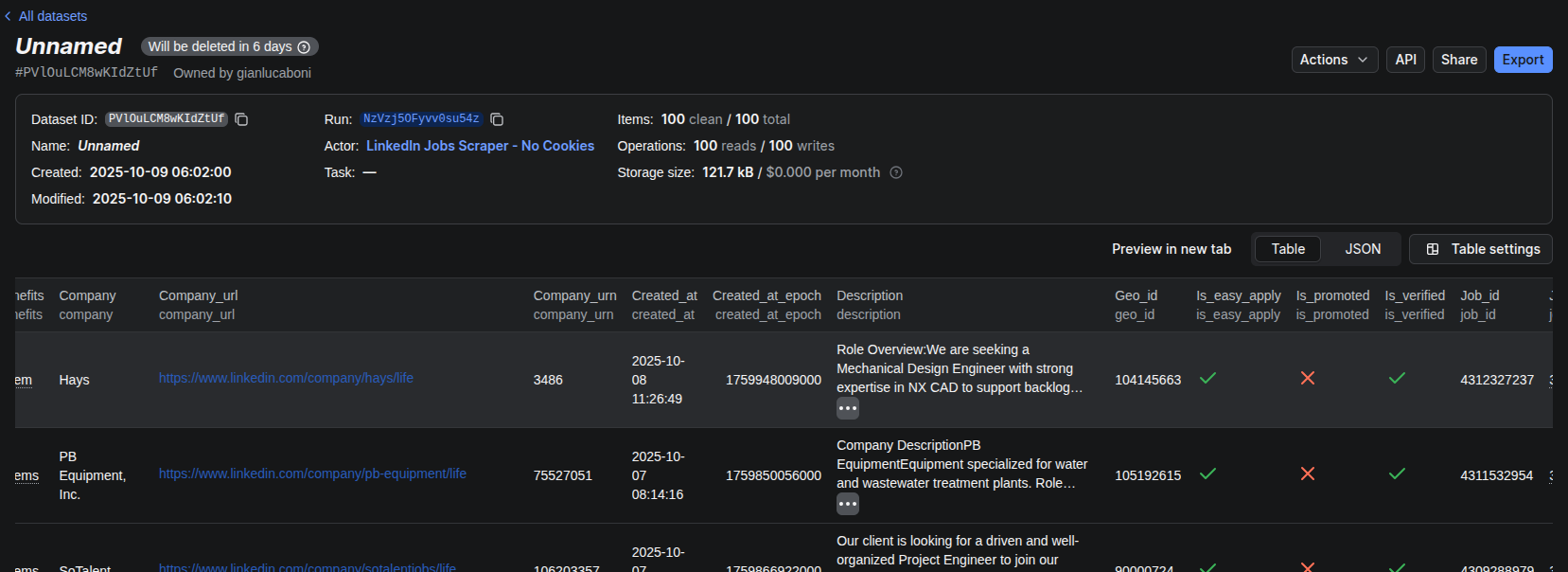
Since the free tier wipes datasets after a few days, I set up a quick script to pull everything down and stash it in a local SQLite database — simple, light, and future-proof enough for my needs.
Even better, Apify lets you schedule runs automatically, so once it’s set, you can forget about it and watch fresh job data roll in on autopilot.
Here’s what a typical data point looks like:
{
  "company": "Hays",
  "company_url": "https://www.linkedin.com/company/hays/life",
  "company_urn": "3486",
  "job_title": "Mechanical Design Engineer",
  "job_url": "https://www.linkedin.com/jobs/view/4312327237",
  "job_id": "4312327237",
  "location": "Redmond, WA",
  "work_type": "On-site",
  "salary": null,
  "posted_at": "2025-10-08 11:27:31",
  "posted_at_epoch": 1759948051000,
  "skills": [],
  "benefits": [
    "3 benefits"
  ],
  "is_easy_apply": true,
  "is_promoted": false,
  "applicant_count": "25 applicants",
  "description": "Role Overview: We are seeking a Mechanical Design Engineer with strong expertise in NX CAD to support backlog cleanup, documentation standardisation, and detailed modeling. The role involves consolidating technical drawings from multiple vendors and formats into a ...",
  "created_at": "2025-10-08 11:26:49",
  "created_at_epoch": 1759948009000,
  "geo_id": "104145663",
  "navigation_subtitle": "Hays · Redmond, WA (On-site)",
  "is_verified": true,
  "job_insights": [
    "On-site",
    "Contract",
    "0 of 8 skills match"
  ],
  "apply_url": "https://www.linkedin.com/job-apply/4312327237"
}
Making It Talk: A Flask API With a Brain
Once I had the data, I needed a way to interact with it, not just through scripts, but through a proper API that my frontend could query.
Enter Flask-RESTX, the framework that saves your Flask code from degenerating into spaghetti.
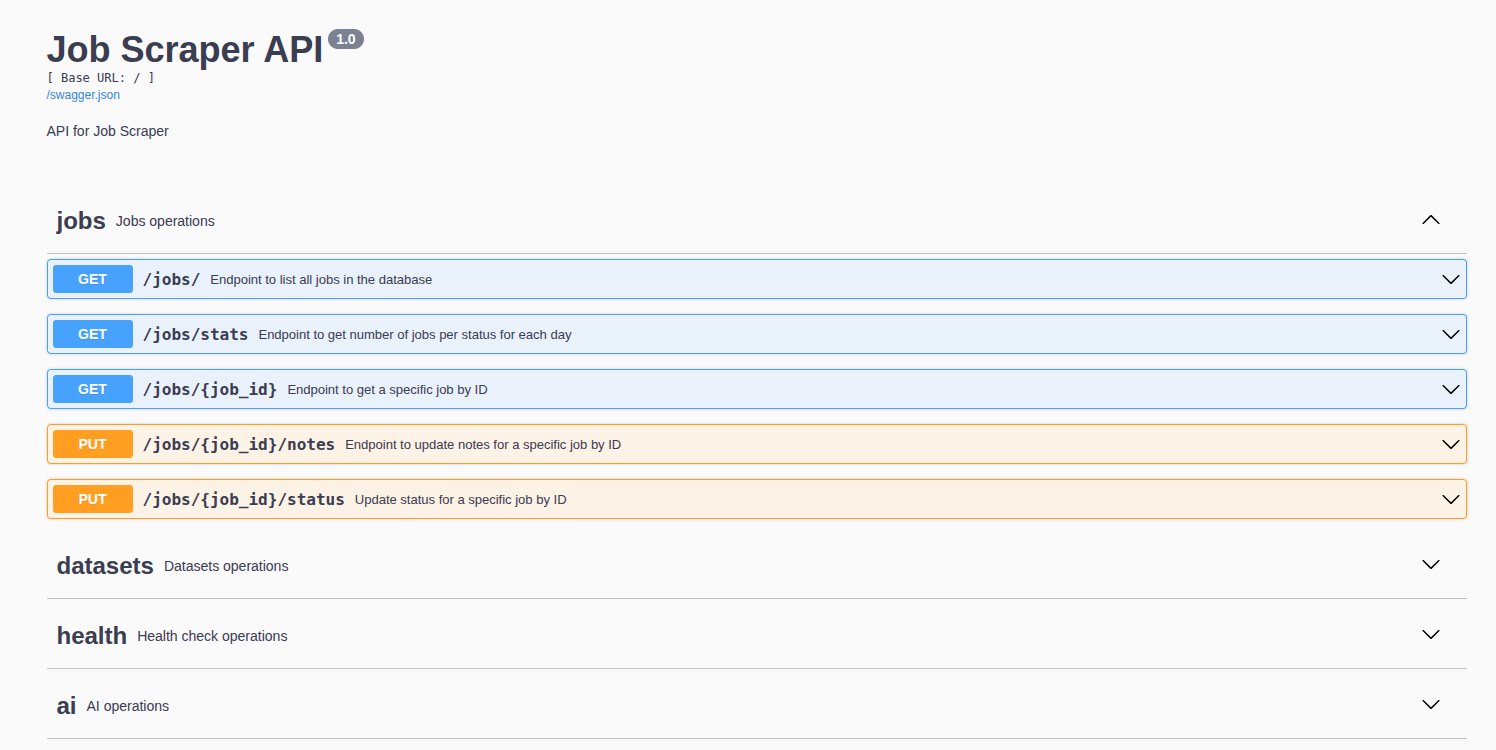
/healthjust to check if the API is alive,/datasetsto sync new job data from Apify,/jobsto manage my job entries,- and
/ai— the fun one — where all the smart stuff happens.
import flask_cors
from flask import Flask, request
from flask_restx import Api, Resource, fields

app = Flask(__name__)
flask_cors.CORS(app)
api = Api(
    app, version="1.0", title="Job Scraper API", description="API for Job Scraper"
)

# namespaces initialization
ns_jobs = api.namespace("jobs", description="Jobs operations")
ns_datasets = api.namespace("datasets", description="Datasets operations")
ns_health = api.namespace("health", description="Health check operations")
ns_ai = api.namespace("ai", description="AI operations")


# main job route
@ns_jobs.route("/")
class ListJobsResource(Resource):
    def get(self):
        """Endpoint to list all jobs in the database.""" # this description will appear in the interactive documentations
        Session = sessionmaker(bind=conn)
        session = Session()
        try:
            jobs = session.query(Job).all()
            job_list = [serialize_model(job) for job in jobs]
            return {"jobs": job_list}, 200
        except Exception as e:
            return {"error": str(e)}, 500
        finally:
            session.close()
The best part? Swagger docs come built-in, meaning I got an interactive UI for testing endpoints without extra effort. My future self will thank me when I forget how any of this works.
Object-Relational Mapping with SQLAlchemy
Recently, I had the chance to build part of a platform using Laravel, and although my knowledge of PHP is quite limited, I really enjoyed how the framework handles database versioning through models and migrations.
The core idea behind Object-Relational Mapping (ORM) is to create a layer between a relational database and an object-oriented programming language. Thanks to this mapping, developers don’t need to write raw SQL queries — instead, they define tables and their relationships directly in the code.
SQLAlchemy provides a solid module for building this kind of structure, and I think it’s a great way to reduce complexity while keeping a clear blueprint of your database within your codebase.
For this small project, I designed only two tables, so I didn’t have to deal with complex relationships. Still, the ORM approach saved me from the burden of writing SQL manually. On top of that, having your schema defined in code helps tools like GitHub Copilot generate the right endpoints, since the table structures are explicitly described.
## use orm approach with sqlalchemy
from sqlalchemy import Column, String
from sqlalchemy.ext.declarative import declarative_base
from sqlalchemy import Integer, Boolean, Text, JSON

# define table structrure for datasett
Base = declarative_base()


class Dataset(Base):
    __tablename__ = "processed_datasets"

    id = Column(String, primary_key=True)
    # store the modified timestamp as string to avoid parsing/ timezone issues here
    last_modified = Column(String, nullable=False)


class Job(Base):
    __tablename__ = "jobs"

    # primary key: job_id from the incoming payload
    id = Column(String, primary_key=True)  # maps to "job_id"

    # basic job fields
    job_title = Column(String, nullable=False)  # "job_title"
    job_url = Column(String, nullable=False)  # "job_url"
    apply_url = Column(String)  # "apply_url"

    # company info
    company = Column(String, nullable=False)  # "company"
    company_url = Column(String)  # "company_url"
    company_urn = Column(String)  # "company_urn"

    # location / work type / meta
    location = Column(String)  # "location"
    work_type = Column(String)  # "work_type"
    navigation_subtitle = Column(String)  # "navigation_subtitle"
    geo_id = Column(String)  # "geo_id"

    # posting timestamps
    posted_at = Column(String)  # "posted_at" (ISO string)
    posted_at_epoch = Column(Integer)  # "posted_at_epoch"
    created_at = Column(String)  # "created_at"
    created_at_epoch = Column(Integer)  # "created_at_epoch"

    # counts / flags
    applicant_count = Column(String)  # "applicant_count"
    is_easy_apply = Column(Boolean, default=False)
    is_promoted = Column(Boolean, default=False)
    is_verified = Column(Boolean, default=False)

    # content fields
    salary = Column(String, nullable=True)  # "salary"
    description = Column(Text)  # "description"

    # arrays / structured fields stored as JSON
    skills = Column(JSON)  # "skills" (list)
    benefits = Column(JSON)  # "benefits" (list)
    job_insights = Column(JSON)  # "job_insights" (list)

    # extra fields to be populated by users
    notes = Column(Text, nullable=True, default=None)  # user notes
    status = Column(String, nullable=True, default=None)  # e.g. "applied", "
    status_updated_at = Column(
        String, nullable=True, default=None
    )  # timestamp of status update
    AI_feedback = Column(Text, nullable=True, default=None)  # user rating 1-5
    cover_letter = Column(
        Text, nullable=True, default=None
    )  # user generated cover letter
I’ve attached a small snippet below to show how this approach works when you need to access (and eventually modify) data from an SQL table. What I really like about it is how Pythonic the syntax feels. Once you retrieve a row from the table, updating it is as simple as changing an attribute on a regular object: no verbose SQL statements, no manual commits scattered around. It’s clean, readable, and perfectly aligned with the Python philosophy: simple is better than complex.
@ns_jobs.route("/<string:job_id>/notes")
class UpdateJobNotesResource(Resource):
    @ns_jobs.expect(notes_model, validate=True)
    def put(self, job_id):
        """Endpoint to update notes for a specific job by ID."""

        notes = request.json.get("notes")
        if notes is None:
            return {"error": "Notes field is required"}, 400

        Session = sessionmaker(bind=conn)
        session = Session()
        try:
            job = session.query(Job).filter_by(id=job_id).first()
            if not job:
                return {"error": "Job not found"}, 404
            job.notes = notes
            session.commit()
            return {"message": "Job notes updated successfully"}, 200
        except Exception as e:
            session.rollback()
            return {"error": str(e)}, 500
        finally:
            session.close()
Giving It a Brain: The AI Layer
Now, for the fun part: AI.
The goal was simple: generate tailored cover letters and score how well each job fits me, based on my résumé and the job description.
I created a JobAnalyzer class to handle both tasks:
assess_skill_compatibilityruns automatically whenever new jobs are fetched. It uses an LLM to rate how well my profile matches each role;
@ns_datasets.route("/update_datasets")
class UpdateDatasetsResource(Resource):
    def get(self):
        """Endpoint to update processed datasets from Apify into the database."""
        try:
            stats_from_update = update_processed_datasets(conn)

            # After updating datasets, assess skill compatibility for new jobs
            Session = sessionmaker(bind=conn)
            session = Session()
            try:
                # Get newly added jobs (jobs without AI_feedback)
                new_jobs = session.query(Job).filter(Job.AI_feedback == None).all()

                assessed_count = 0
                for job in new_jobs:
                    # Build job_data dict with all relevant Job model fields
                    job_data = {
                        "job_title": job.job_title,
                        "company": job.company,
                        "location": job.location,
                        "description": job.description,
                        "work_type": job.work_type,
                        "skills": job.skills if job.skills else [],
                        "benefits": job.benefits if job.benefits else [],
                    }

                    # Assess skill compatibility using LLM
                    skill_rating = job_analyzer.assess_skill_compatibility(job_data)

                    # Store the rating in AI_feedback field
                    job.AI_feedback = skill_rating
                    assessed_count += 1

                session.commit()
                print(f"AI feedback generated for {assessed_count} new jobs")
            except Exception as e:
                session.rollback()
                print(f"Error during skill compatibility assessment: {str(e)}")
            finally:
                session.close()

            return {
                "message": f"Processed datasets updated successfully. New datasets added {stats_from_update['new_datasets']} - New jobs added {stats_from_update['new_jobs']}"
            }, 200
        except Exception as e:
return {"error": str(e)}, 500generate_cover_letteris triggered manually when I click a button in the app. I didn’t want letters for every single posting, only for those worth my time (and tokens).
@ns_ai.route("/generate_cover_letter/<string:job_id>")
class GenerateCoverLetterResource(Resource):
    def post(self, job_id):
        """Generate a cover letter for a specific job by ID."""
        Session = sessionmaker(bind=conn)
        session = Session()
        try:
            job = session.query(Job).filter_by(id=job_id).first()
            if not job:
                return {"error": "Job not found"}, 404

            # Build job_data dict with all relevant Job model fields
            job_data = {
                "job_title": job.job_title,
                "company": job.company,
                "location": job.location,
                "description": job.description,
                "work_type": job.work_type,
                "skills": job.skills if job.skills else [],
                "benefits": job.benefits if job.benefits else [],
            }

            # Generate personalized cover letter using LLM
            cover_letter = job_analyzer.generate_cover_letter(job_data)

            job.cover_letter = cover_letter
            session.commit()
            return {
                "message": "Cover letter generated successfully",
                "cover_letter": cover_letter,
            }, 200
        except Exception as e:
            session.rollback()
            return {"error": str(e)}, 500
        finally:
            session.close()
What’s neat is that the model returns structured output validated through Pydantic, meaning the feedback isn’t random text. It’s clean, typed, and predictable. Exactly what you want when an LLM sits at the core of your workflow.
class JobAnalyzer:
    """Service for LLM-powered job application features."""

    # define SkillRating type with pydantic
    class SkillRating(BaseModel):
        rating: Literal["Excellent", "Good", "Fair", "Poor"]

    def __init__(self):
        """Initialize the job analyzer with OpenAI API configuration."""
        self.api_key = os.getenv("OPENAI_API_KEY")
        self.model_name = os.getenv("OPENAI_MODEL", "gpt-4o-mini")

        if not self.api_key:
            print(
                "Warning: OPENAI_API_KEY not found in environment variables. Using mock mode."
            )
            self.model = None
            self.model_for_feedback = None
        else:
            # Initialize ChatOpenAI model
            self.model = ChatOpenAI(api_key=self.api_key, model=self.model_name)
            # Create structured output version for skill assessment
            self.model_for_feedback = self.model.with_structured_output(
                self.SkillRating
            )
            print(f"Initialized model: {self.model_name}")

        # Load prompts from files
        self.prompts_dir = os.path.join(os.path.dirname(__file__), "prompts")
        self._load_resume()
        self._load_prompts()
The Interface: Minimal but Mine
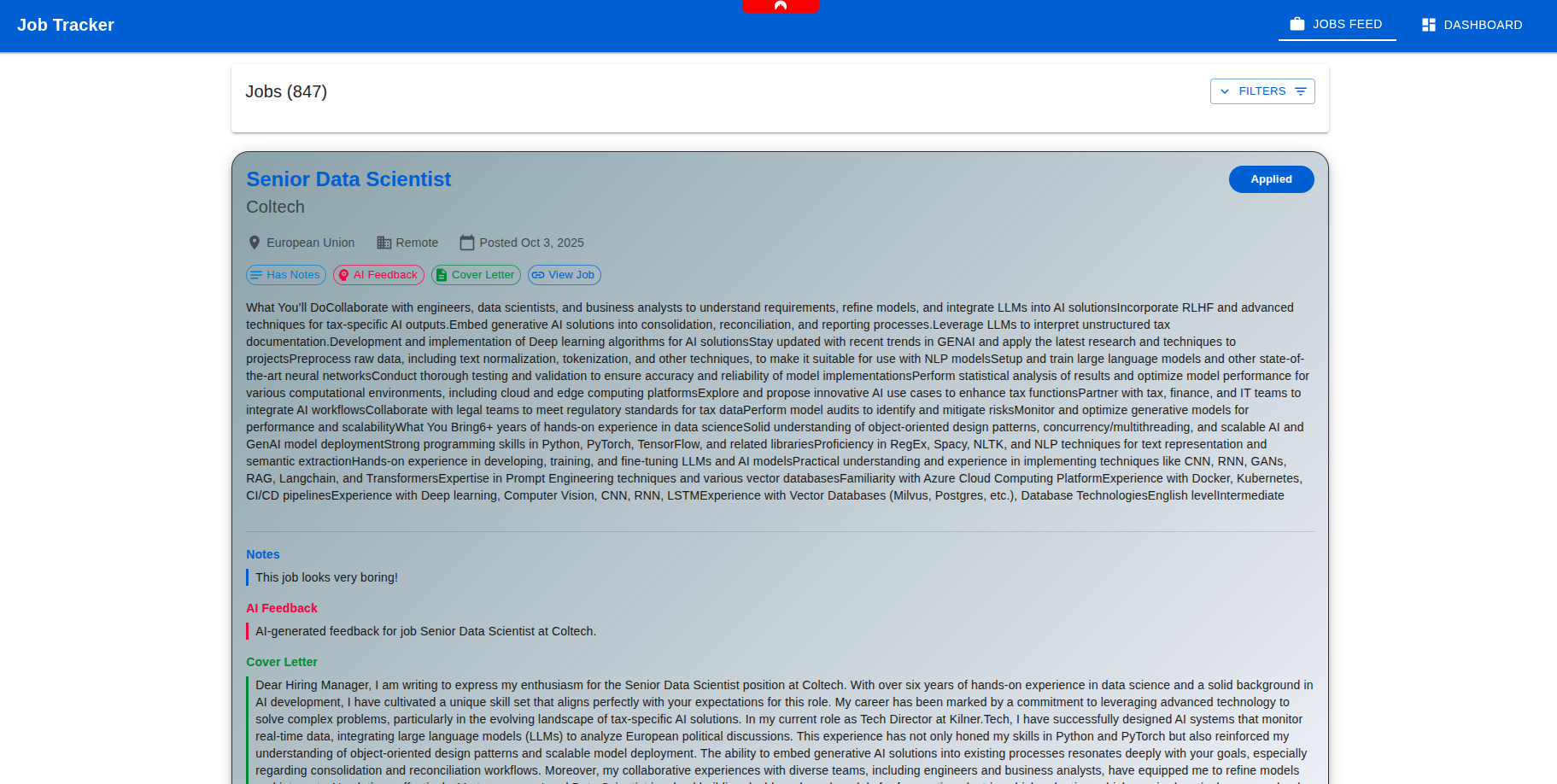
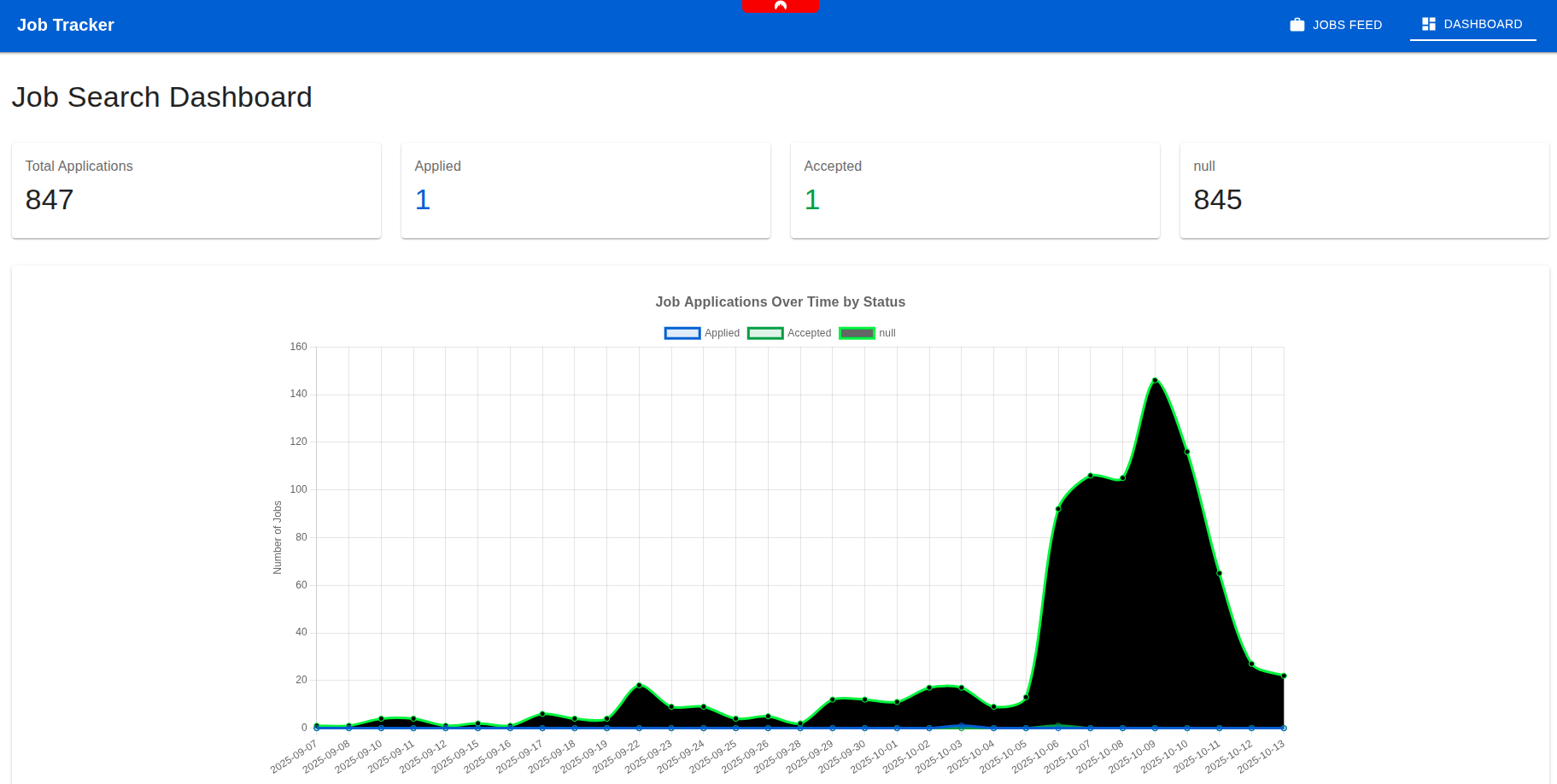
Once the backend was running smoothly, I built a minimal React frontend (probably overkill for a two-page app), but I enjoy React too much to resist.
One page lists job ads with filters and notes, while the other shows simple charts about my application progress. That’s all I needed: a tidy control room for job hunting, powered by my own AI assistant.
Here are a few screenshots of the final result, just to give an idea.
What I Learned (and Why It was Worth It)
This started as a small revenge project against formalities, but it ended up teaching me a lot.
I learned that good architecture pays off even for “toy” projects: structuring data pipelines, APIs, and AI layers cleanly makes experimentation much easier.
I also realized how AI can be practical without being overhyped: it’s not about magic, it’s about saving yourself from repetitive nonsense.
And most importantly, I rediscovered the joy of building something end-to-end, from scraping data to analyzing it, from API to UI, that actually solves my problem.
If you’re curious to see how it all comes together, have a look at the repo. It’s a quick-and-dirty build, but with just enough polish to hold up.
So yes, I may still hate cover letters ... but at least now, my app writes them for me.